Post
Follow
Automated Patient Appointment Reminder Calls from Dentrix (Henry Schein) with 1-800 Notify - ONE-TIME SETUP

Want to try our appointment reminders? Click here: http://www.1800notify.com/signup/
ONE TIME SETUP
In this article we show you how to set up your Dentrix system to be able to make customized patient appointment reminder calls with 1-800 Notify. This article is the one-time setup required to run your daily export. The daily export is shown in this related article:
https://1800notify.zendesk.com/entries/47449765
Step 1: Log into your Dentrix system.
Step 2: (Do This ONE TIME ONLY) Create a new Dentrix Custom Letters report.
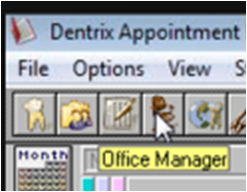
2-1. If you are in the Appointment Book view, Click the Office Manager icon to go into the Office Manager view.
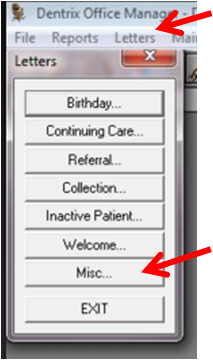
From the Office Manager menu, click the Letters menu then click Misc as shown.
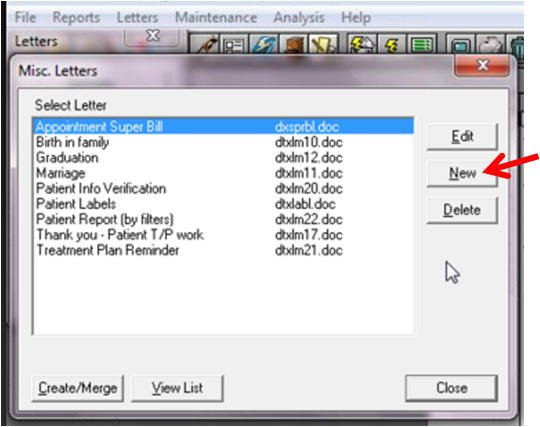
2-2. From the Misc. Letters window, click the NEW button.
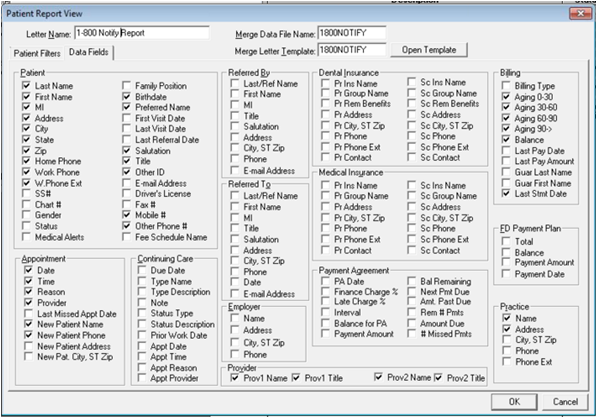
2-3. In the Patient Report View window, type the following:
Letter Name = 1-800Notify Appt. Report
Merge Data File Name: 1800NOTIFY
Merge Letter Template: 1800NOTIFY

2-3. Click on the Data Fields tab under the Letter Name.

2-4. Make sure to check the following data fields within the listed areas of the Data Fields screen as shown below, leave all other fields unchecked.
Patient: Last Name, First Name, MI, Address, City, State, Zip, Home Phone, Work Phone, W.Phone Ext, Birth date, Preferred Name, Salutation, Title, Other ID, Mobile #, Other Phone #
Appointment: Date, Time, Reason, Provider, New Patient Name, New Patient Phone
Provider: Prov1 Name, Prov1 Title, Prov2 Name, Prov2 Title
Billing: Aging 0-30, Aging 30-60, Aging 60-90, Aging 90 ->, Balance, Last Stmt Date
Practice: Name, Address
Make sure all other check boxes are unchecked.
2.5. Click OK at the bottom right portion of the screen to save your new report for 1-800 Notify. Now you should see your newly created Letter Report on the list:

YOU ARE NOW DONE WITH THE ONE-TIME SETUP WORK.
PLEASE SEE THE DENTRIX DAILY ROUTINE ARTICLE SHOWING YOU HOW TO DO THE DAILY EXPORT USING THIS NEW CUSTOM LETTER:
https://1800notify.zendesk.com/entries/47449765
Please sign in to leave a comment.